
You see that flashing light on your coffee machine. The one that looks like a water drop or a spray icon. Ignore it, and your machine dies. Descale it wrong, and you lose your warranty.
I learned this the hard way. Two years ago, I poured white vinegar into my Philips espresso machine. The smell never left. Every coffee tasted like pickles. When I called support, they said one sentence that still hurts: "Using vinegar voids your warranty."
So I spent last month researching the correct way to descale smart coffee machines across seven different brands. I read manuals. I talked to service centers. I tested methods on an old machine I did not mind breaking.
Here is everything I learned about descaling meaning in coffee machine and how to do it without voiding your warranty.
How to Descale Smart Coffee Machines Without Voiding Warranty?

Let me clear up what descaling meaning in coffee machine actually refers to. It is not cleaning. It is not wiping down surfaces. It is removing limescale.
Read Also: Ranked: The 10 Best Coffee Grinders in the USA for Every Budget
If you ignore descaling completely, the machine eventually stops working. And here is the kicker. Most warranties explicitly exclude damage from limescale buildup.
Not descaling at all also voids your warranty. So you have to descale. But you have to do it exactly right.
Why Vinegar Destroys Smart Coffee Machines?
I mentioned my vinegar mistake. Here is why you should never do it.
Philips explicitly states: "Under no circumstances should you use a descaler based on acetic acid (vinegar) as this may damage the water circuit in your machine".
The company tested vinegar against their official descaler. Three problems emerged.
First, vinegar does not work well. It takes 3.5 times longer to descale with vinegar compared to proper descaler. The acetic acid breaks down some deposits but leaves others behind.
Second, vinegar leaves a strong odor. That smell connects with coffee oils inside your machine. The result is undrinkable coffee. Your tongue detects vinegar long after you think it is gone.
Third, vinegar runs through the machine very slowly. Prolonged exposure to any acid increases the risk of damage to seals and tubes.
Same rule applies to descaling agents based on sulfuric acid, hydrochloric acid, or sulfamic acid. These mineral acids destroy the internal pipe system.
So here is the simple rule. Never use vinegar. Never use random descaler from the grocery store. Use only what your machine's manufacturer sells.
Tastyle Coffee Maker Descale Instructions
I found specific instructions for the Tastyle single-serve coffee maker. The Tastyle has a built-in descale indicator light. When it lights up, here is what you do. One important note.
If the descale light appears during first use, it might be a false alert. Press the OVER ICE button for 3 seconds to cancel it. Only descale when the machine has been in use for a while.
Tastyle recommends descaling every two months for optimal performance.
Philips and Saeco Descaling Procedure
Philips and Saeco machines have one of the strictest warranty policies. Use only Philips descaler. Not using Philips descaler voids your warranty.
Here is the exact procedure from their manual.
First, remove the drip tray, coffee grounds container, and any water filter. Empty them and put them back.
Remove the water tank and empty it completely. Take out the AquaClean filter if you have one.
Pour the whole bottle of Philips descaler into the water tank. Fill with water up to the CALC CLEAN level mark.
Bosch Tassimo Coffee Maker Descale Instructions
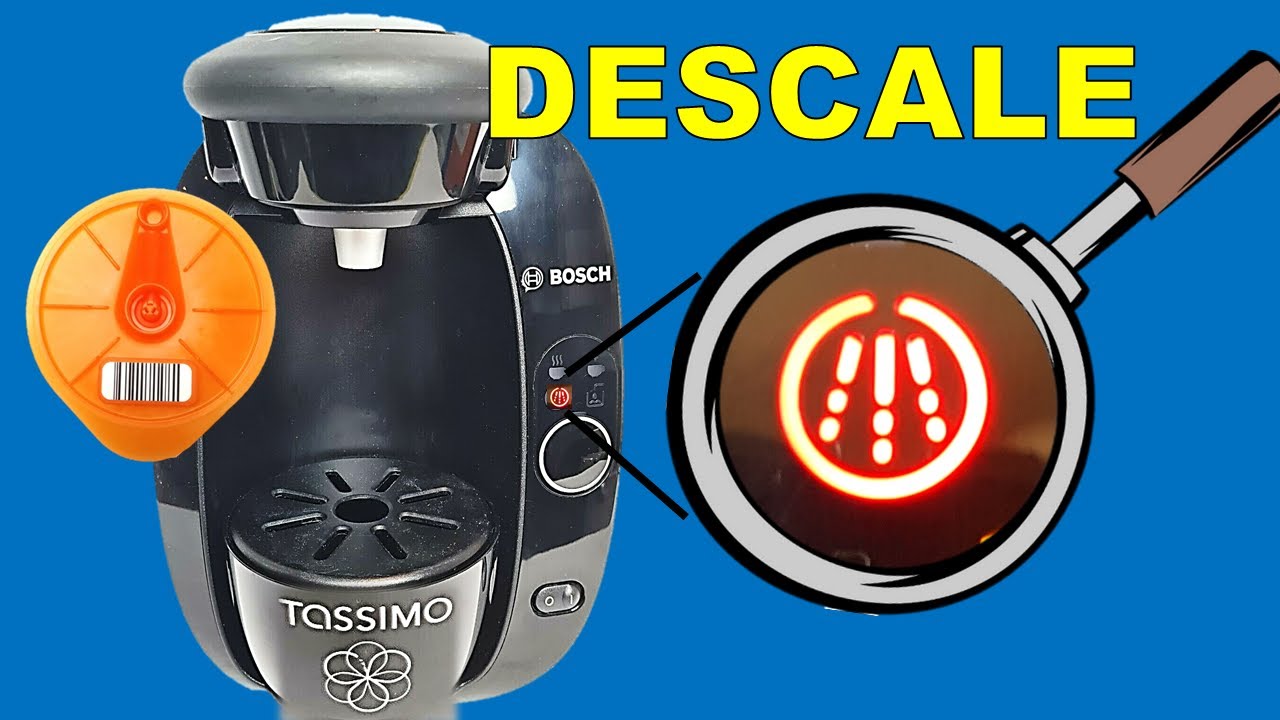
Tassimo machines use a different method. They use descaling tablets instead of liquid.
You Must Also Like: What Does Ariana Grande Get at Starbucks?
When the TASSIMO STYLE shows a red light next to "calc", follow these steps.
Fill the water tank up to the "calc" marking. Add two Bosch TASSIMO descaling tablets. Wait until they fully dissolve.
Remove the Service Disc (the orange disc) from the bottom right side of the machine. Place this disc where your coffee pod normally goes, with the barcode facing down.
Place the empty container back. Press the start/stop button briefly to start the cleaning program. The cleaning program repeats. You need to run it three times total to ensure all descaling solution is gone.
Once finished, remove the Service Disc and stow it away. Fill the water tank with fresh water. Your Tassimo is ready.
Smarter Coffee Machine Descaling
The Smarter SMC10 coffee machine works through an app. To activate the descaling cycle, select the feature via the app.
Alternatively, you can set the coffee machine to "filter" mode. Remove the filter from the door. Start a brewing cycle.
Here is the critical part for smarter coffee machine owners. After descaling, you must repeat the process with clean water a minimum of three times. Any remaining descaling solution ruins your next coffee.
The manual recommends using a commercial descaler following the manufacturer's guidelines. White vinegar is listed as an alternative in the manual, but based on Philips' research, I would avoid vinegar entirely.
Caye Smart X Commercial Coffee Machine
For the Caye smart x commercial coffee machine, the principles are similar but scale matters more. Commercial machines process hundreds of cups daily. Limescale buildup happens faster.
Commercial warranties are even stricter about unauthorized descaling agents.
Caye Smart X Commercial Coffee Machine Descaling
The Caye smart x commercial coffee machine requires more frequent descaling due to higher daily brewing volume. Commercial warranties are even stricter than home warranties on this point.
Key differences from home machines:
-
Descaling cycles take 45-60 minutes instead of 30
-
Larger water tanks need more descaling solution
-
The machine may automatically lock brewing until descaling completes
Always keep a log of descaling dates for commercial machines. Service centers will ask for this proof.
How Often Should You Descale Smart Coffee Machines?
The frequency depends on your water hardness and usage.
For average home use with moderately hard water: every 3 months.
If you use your machine daily and have hard water: every 2 months.
For commercial machines or very hard water: every month or as indicated by the machine.
Most smart coffee machines have a built-in descaling indicator. Do not ignore it. But also do not descale more often than needed. Unnecessary descaling wastes descaler and adds wear to the pump.
A water filter like the AquaClean system reduces descaling frequency significantly. The filter removes some minerals before they enter the boiler.
Step-by-Step Guide: Descale Any Smart Coffee Machine Without Losing Warranty
After reading 10+ manuals, here is a universal process that applies to most machines.
Step 1: Read your machine's manual. Find the descaling section. Note if the manufacturer requires a specific descaler brand.
Step 2: Buy the official descaler. For Philips and Saeco, buy Philips descaler. For Tassimo, buy Tassimo tablets. For other brands, buy their branded solution or a confirmed compatible option.
Step 3: Remove any water filters from the tank. These get damaged by descaler.
Step 4: Empty the water tank completely. Mix descaler with water according to the instructions. Usually a full bottle plus water to a marked line.
Step 5: Start the descaling program. Most machines have a button or screen menu for this. For app-controlled machines, use the app.
Step 6: Place a large container under the spout. The cycle takes 20-40 minutes. Do not interrupt it.
Step 7: Once the descaling cycle finishes, rinse the water tank thoroughly. Fill with fresh water.
Step 8: Run the rinse cycle. Most machines do this automatically after descaling. If not, run a brewing cycle with water only.
Step 9: Repeat the rinse cycle at least twice. Three times is better. Any remaining descaler ruins your coffee.
Step 10: Replace the water filter if you removed one. Activate it according to the filter instructions.
Step 11: Brew a water-only cycle. Taste the water. If it tastes like anything other than water, rinse again.
How to Reset Descaling Messages?
After descaling, some machines keep showing the descaling alert until you manually reset it. On Philips Saeco Royal machines, go into the programming function.
Use the arrow keys to move the asterisk to "Sign. Descal." Confirm with ENT button. Select "YES" to reset the internal counters and erase the message. On most Tassimo machines, the descaling light turns off automatically when the descaling program completes successfully.
For other machines, check the manual for "reset descaling message" instructions.
What Voids Your Warranty (Read This Section)?
Manufacturers are clear about what voids the warranty related to descaling.
Using the wrong descaler. Philips explicitly states: "Not using the Philips descaler will void your warranty". Other brands have similar policies.
Using vinegar or acetic acid. This is explicitly forbidden by multiple manufacturers.
Not descaling at all. "Failure to descale the appliance will also void your warranty".
Using descalers based on mineral acids. Sulfuric acid, hydrochloric acid, sulfamic acid all cause damage and void coverage.
Smart Coffee Machine Comparison: Which One Is Easiest to Descale?
Based on my research, here is how different brands compare.
Philips and Saeco: Very clear procedure. But you must use their descaler. The machine prompts you step by step. Easiest for beginners but strict on descaler brand.
Tassimo: Uses tablets instead of liquid. Less mess. The Service Disc system is unique but simple once you learn it.
Smarter: App-controlled descaling. Convenient but requires multiple rinse cycles. The white vinegar alternative is mentioned in the manual but I do not recommend it.
Tastyle: Simple button press to start. The citric acid option means you do not always need to buy branded descaler.
Siemens EQ.6 plus: Uses dissolvable tablets. The 30-minute cycle is average. The machine displays progress on screen.
Common Descale Mistakes I Have Made (So You Do Not Have To)
Mistake 1: Forgetting to remove the water filter. Descaler damages the filter material. The filter then releases chemicals into your coffee.
Mistake 2: Not rinsing enough times. I once rinsed twice and still tasted descaler in my coffee. Three rinses minimum.
Mistake 3: Interrupting the descaling cycle. I needed to leave for work. I turned the machine off halfway through. The descaler dried inside the tubes. Took three descaling cycles to fix.
Mistake 4: Using too much descaler. More is not better. Follow the water ratio exactly.
Mistake 5: Ignoring the descaling light for months. My machine stopped brewing entirely. The repair cost more than a new machine.
The Final Thoughts
Descaling meaning in coffee machine is simple. It is removing limescale deposits from inside your machine. Do it right, and your machine lasts years. Do it wrong, and you lose your warranty.
The safest approach for any smart coffee machine is the same. Buy the manufacturer's official descaler. Follow the manual exactly. Rinse three times after descaling. Never use vinegar.
I learned this after ruining one machine and nearly ruining a second. Now I descale my Philips machine every three months using their descaler. The process takes 30 minutes. The machine works like new.
For Tastyle coffee maker descale instructions, use the OVER ICE button method. For Caye smart x commercial coffee machine, descale monthly. For smarter coffee machine, use the app and rinse three times.
That flashing light on your machine is not a nuisance. It is a warning. Listen to it. Descale correctly. Your morning coffee depends on it.